Showing posts with label Flash CS5. Show all posts

Sunday, November 21, 2010

PE9-Flash CS5


Motion Sickness
 Okay, what do you do when you have gone overboard already playing with motion tweens, and you want to save a certain effect so that you don’t have to recreate from scratch? ……….Save a Motion Preset.
 I actually saw how easy it was by accident. I right clicked my white rose and selected insert motion tween. I dragged the rose a few inches on the stage and then I right clicked to see save as Motion Preset as an option.

 Save a name for it, and when you want to apply it again go to the motion Preset menu and look for it under the Custom presets folder.
3.   You can do this for any Motion Preset you are using.

Experiment, a little but be careful…there is enough tacky website design out there joined to the hip with bells and whistles.
JCIII

PE8-Flash CS5


PE8
Tweeny Lil Rose
 In the same document Lynda.com chapter, I was exposed to the Motion Presets, which allow you to automatically apply some standard but dynamic effects to imagery in Flash…
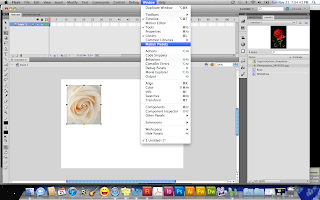
First I imported another rose, and saved it as a symbol…. (I’m on a rose kick today)

 This time, save the Rose as a Movie Clip Symbol. 
You most save a symbol as Movie Clip to use a motion tween. 

Drag the white Rose symbol to the stage and while it is selected go to Window » Motion Presets

3.   The Motion Presets window comes up with a list of motion tweens. And a small window at the top that previews what the effect will do when applied. Once you have chosen the desired Motion, click Apply.   
You will see the motion applied to the Timeline. 


The Motion tween is shown on the file at a neon-jagged line that outlines what direction the animation will take the graphic into. 
1.   
4.   To preview the effect, click the Control Window » Test movie » Test which will so you what the effect looks like.

Before you get too heavily into everything else I thought it might make you eager to learn more if you saw how quickly you and animate something. 
JCIII

PE7-Flash CS5

(A Rose by any other instance…is still a symbol)

At times to me Flash can be extremely frustrating and boring when the lessons deal with the essentials, probably because they sometimes tend to straddle between need to know info, I already know info, and I could have figured this out with a little time to play so this time out I played with some effects (That is what people us Flash for anyway)

This one way important to me to grasp because I am very graphic designer makes you kind of partial to pictures…The concept of Symbols as it relates to Flash:

My screen shots will give you a visual example.

1.   I opened up a Flash document and when to File » Import » Import image to Library. 

the picture I selected it the rose you see. Saving the image to the Library is a way of collecting you resources much like saving a file for research paper on the computer. This saves the picture in the working Flash file for continued use. 
 Next I dragged the file to the document (stage) and then convert it to a symbol by going to Modify » Convert to Symbol

Background Info: Flash streamlines image usage and keeps file size down by using Symbols. (A representation of a file that you can use repeatedly in the document instead of copying the image over and over again) Once you have a symbol in your library, you can use it over and over again and barely affect file size.


When you convert to symbol you need to name it and choose to convert it either to button, graphic or movie clip; which have characteristics specific to each. This graphic…. is converted as a “graphic”


 The next image shows the Rose being used repeatedly in the Flash file by dragging it from the library to the stage.
5.   Each Rose is call an instance. 4 separate elements on the stage. They can be individual altered and will not affect the Rose from the library UNLESS you specifically alter the Rose directly from the library.  (Think of it like altering an copy of a file sent to you. The original is unaffected unless you alter the original


6.   Using symbol instances can help you to show animation, movement by affecting each based on what you want to do (like frames in a movie…. which is the backbone of what flash does anyway…. it is called a Flash movie)
JCIII